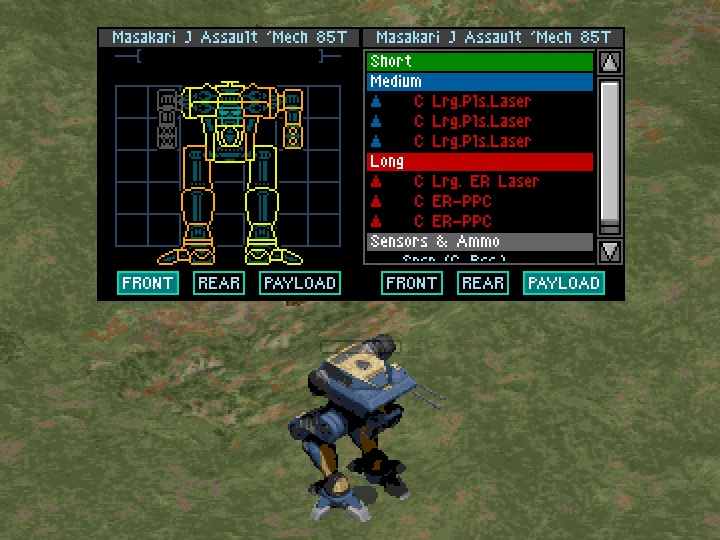
MechCommander 1 has an annoying quirk where it shoves all1 of a mech’s biggest weapons into its left arm. If your mech is kitted out with mostly/only big weapons, then losing that arm means you basically lose the mech.
Normally this issue doesn’t have much impact on the outcome of a mission. Specifically targeting individual locations on a mech has pretty low accuracy (even with high-gunnery pilots) so it tends to not matter much for enemy mechs, and the chance that one of your own mechs loses specifically that arm by pure chance is pretty low — though it can happen. It’s still a weird issue though, and the times where it does happen to you can be a little rough.
Well no more! After being infected by Vana with a brain worm about why the code for distributing components didn’t seem to work for big weapons, I spent a day figuring it out and now have a working fix.
(Note that I’m going to be referring to the location in question as the “left arm” even though it’s not clear whether it’s actually the “left arm” or the “right arm” and the visuals of the mech are inconsistent after losing an arm. This is the location that gets blown off when you use the “fire at left arm” command as labeled in the manual, so I’m going with that.)
About a month ago I noted that MechCommander 1 (or at least the MechCommander Gold copy that I have) seems to come with embedded debugging symbols of some kind, giving some useful limited insight into what the game’s code is actually doing.2
This means that we can take a gander to find out:
- Which weapons count as “big” (is it just the >=9 tons rule I’ve seen tossed around?)
- How weapons and equipment are distributed on a mech
- Why the hell “big” weapons specifically all get lumped into the left arm
Sir, this Long Tom looks real big from down here — I think we can call it “big”
The game exe itself is in machine code (or if first disassembled, assembly). But thanks to tools like Ghidra (yes, by the wonderful folks at the NSA) we can also translate individual functions into C-like code. This translation won’t necessarily be accurate to the structure of the original source code, but it generally has much better at-a-glance readability than the assembly does.
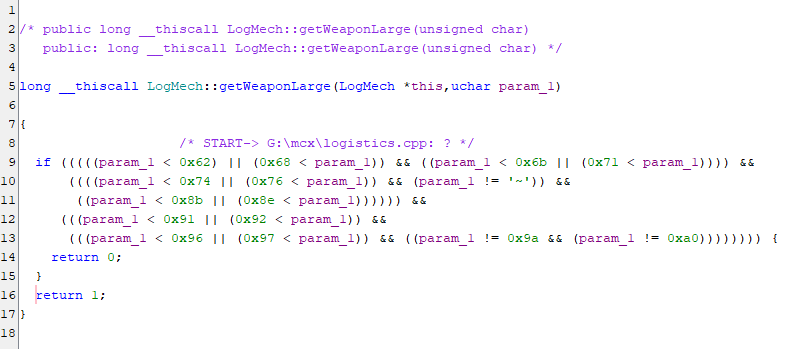
To start off with, here’s the function that seems to determine whether a weapon is “big” “large”, which is the classification that’s relevant to the left arm bug.
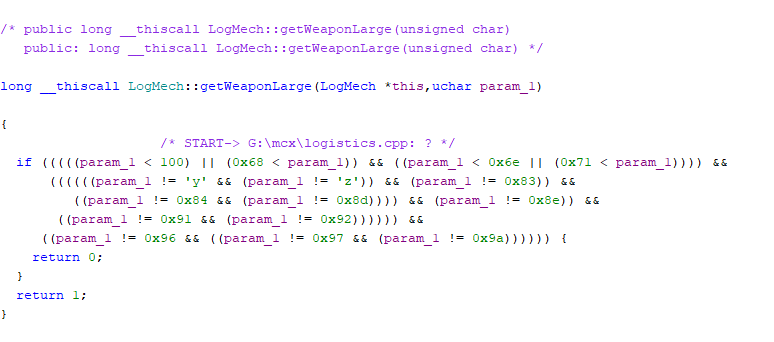
When combined with the weapon IDs in the compbas.csv file (which is packed inside the MISC.FST file)3 and other sources (including some testing of my own), we can translate this into a list of “large” and “small” weapons, where “small” is just everything that isn’t explicitly defined as “large”.
| ID | Weapon | Availability | Tonnage | Size |
|---|---|---|---|---|
| 98 | Rail Gun | Expansion only | 30.0 | Small |
| 99 | Light Gauss Rifle | Expansion only | 13.5 | Small |
| 100 | Light Autocannon | Base game | 9.5 | Large |
| 101 | Autocannon | Base game | 15.5 | Large |
| 102 | Heavy Autocannon | Base game | 19.5 | Large |
| 103 | Light Ultra Autocannon | Base game | 11.0 | Large |
| 104 | Gauss Rifle | Base game | 16.5 | Large |
| 107 | Light LB-X Autocannon | Expansion only | 9.5 | Small |
| 108 | LB-X Autocannon | Expansion only | 14.5 | Small |
| 109 | Heavy LB-X Autocannon | Expansion only | 19.5 | Small |
| 110 | C. Light Ultra Autocannon | Base game | 8.5 | Large |
| 111 | C. Ultra Autocannon | Base game | 13.5 | Large |
| 112 | C. Heavy Ultra Autocannon | Base game | 17.5 | Large |
| 113 | C. Gauss Rifle | Base game | 13.5 | Large |
| 116 | C. Light LB-X Autocannon | Expansion only | 8.5 | Small |
| 117 | C. LB-X Autocannon | Expansion only | 13.5 | Small |
| 118 | C. Heavy LB-X Autocannon | Expansion only | 17.5 | Small |
| 120 | LRM Rack | Base game | 4.0 | Small |
| 123 | SRM Pack | Base game | 3.0 | Small |
| 125 | Streak SRM Pack | Base game | 5.0 | Small |
| 126 | Heavy Thunderbolt | Expansion only | 21.0 | Small |
| 130 | C. LRM Rack | Base game | 3.0 | Small |
| 133 | C. SRM Pack | Base game | 3.0 | Small |
| 135 | C. Streak SRM Pack | Base game | 4.75 | Small |
| 139 | Large X-Pulse Laser | Expansion only | 13 | Small |
| 140 | Laser Laser | Base game | 9.5 | Small |
| 141 | Large ER Laser | Base game | 11.0 | Large |
| 142 | Large Pulse Laser | Base game | 12.0 | Large |
| 143 | Laser | Base game | 4.0 | Small |
| 144 | Pulse Laser | Base game | 6.0 | Small |
| 145 | PPC | Base game | 12.0 | Large |
| 146 | ER PPC | Base game | 15.5 | Large |
| 147 | Heavy Flamer | Base game | 8.0 | Small |
| 150 | C. Large ER Laser | Base game | 10.0 | Large |
| 151 | C. Large Pulse Laser | Base game | 11.0 | Large |
| 152 | C. ER Laser | Base game | 3.5 | Small |
| 153 | C. Pulse Laser | Base game | 4.0 | Small |
| 154 | C. ER PPC | Base game | 13.5 | Large |
| 155 | C. Heavy Flamer | Base game | 7.0 | Small |
| 160 | Long Tom Cannon | Expansion only | 34.0 | Small |
(I’ve excluded several invalid weapons from the list, including a few weapons explicitly checked in the getWeaponLarge() function like the LRM 15 that I assume are just cut content and that — as far as I know — you never actually encounter in-game. The Sniper Cannon which you only get from cheating is also treated as inaccessible content for the purpose of this article)
So the first and most obvious takeaway is that LRMs come in racks but SRMs come in packs, which is vital information for defeating the Clan invaders. Can you imagine if somebody called them LRM packs or SRM racks? You can’t expect the Inner Sphere to fight a war with incorrectly named equipment.
The second most obvious takeaway is that every single weapon added in Desperate Measures has been accidentally classified as a “small” weapon because the getWeaponLarge() function evidently wasn’t updated to consider them, and the default output of the classification function for weapons without explicit exceptions is “small”.
There’s a few classifications that are subjectively a bit borderline. The Light Autocannon is 9.5 tons and “large”, while the Large Laser is the same weight and isn’t considered “large”. I would personally say that if the Large Laser doesn’t count as “large” then the light ACs shouldn’t either, or alternatively the Large Laser should count as Large if the light ACs do, but I don’t think it’s worth losing sleep over and there are some reasonable arguments to keep it the way it is.4
This also shows that although the “being >=9 tons makes it large” rule is close, it’s not quite accurate — even if you give a blanket exclusion of the rule for all of the incorrectly classified Desperate Measures weapons. The aforementioned Large Laser (9.5 tons) and Clan Light Ultra Autocannon (8.5 tons) break the rule.
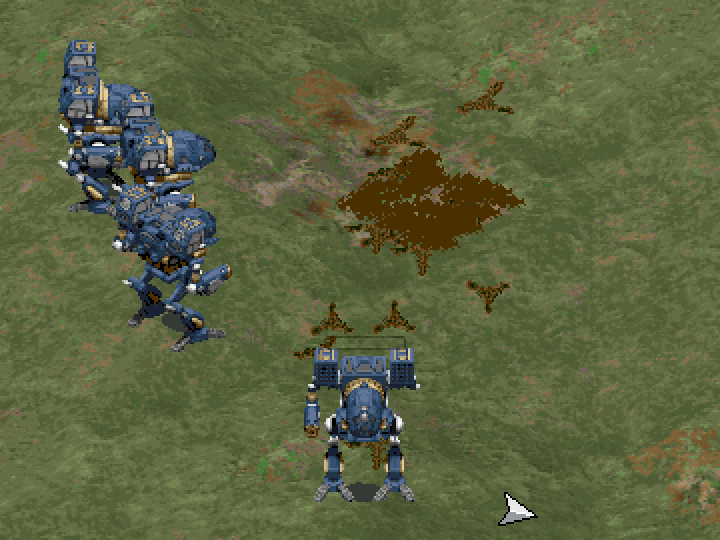
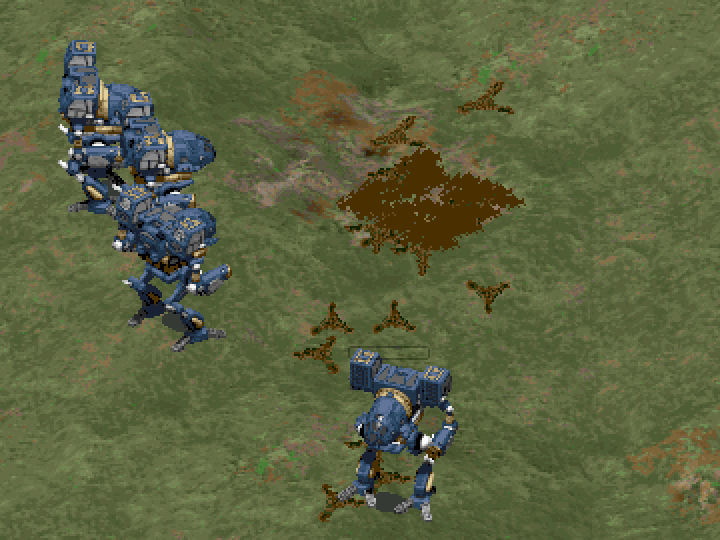
To spot-check that our baseline understanding is correct, we can subject our pilots to several friendly-fire accidents.
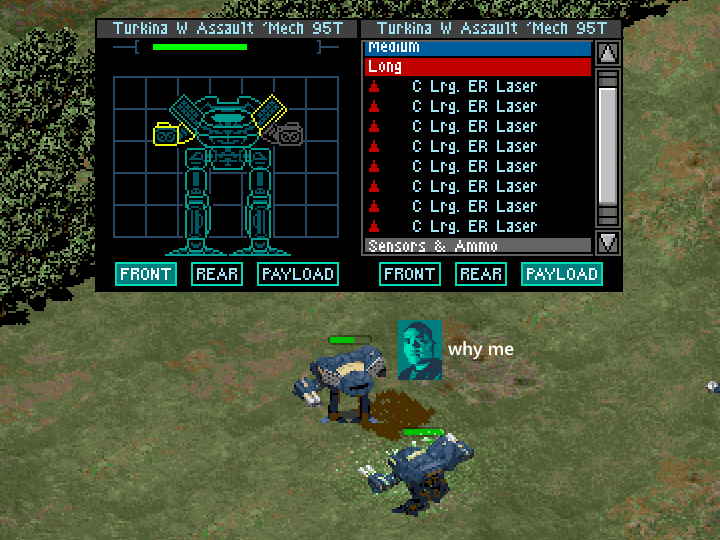
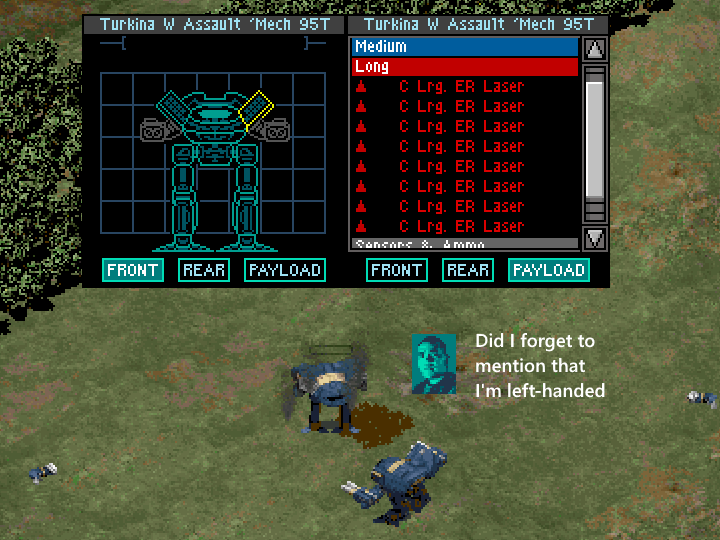
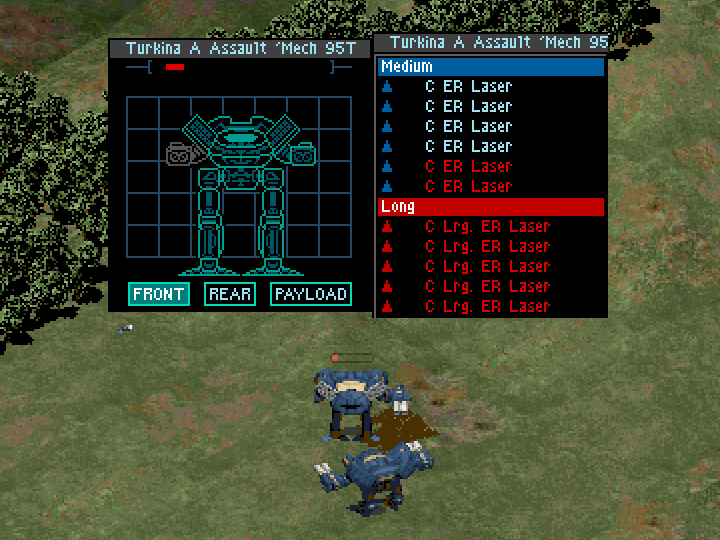
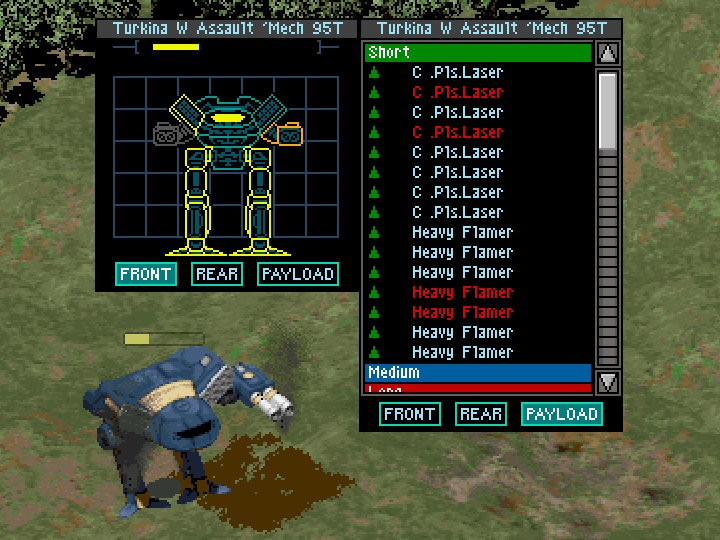
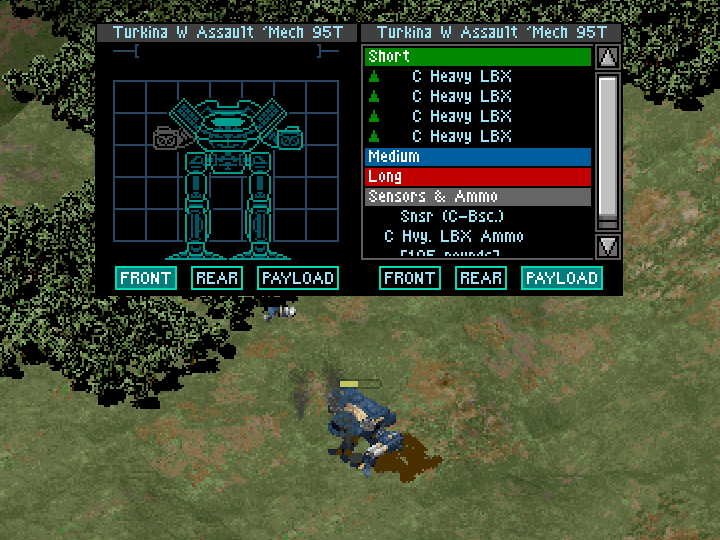
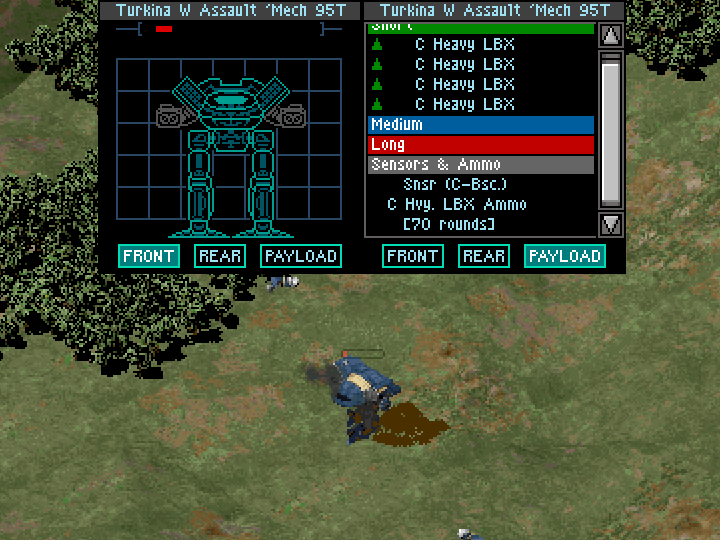
These results support that:
- “Large” weapons do just go into the left arm (and that the paperdoll is mirrored.. or they’re all in the right arm and it’s not mirrored and the manual uses the term “left arm” wrongly).
- “Small” weapons don’t just go into the left arm and are more distributed across the mech.
- Desperate Measures weapons are being incorrectly classified as “small” weapons even though they should logically be “large”.
- Mech pilots should unionize.
If you look too closely you may notice that sometimes the mech being tested on appears to have its right arm destroyed, not its left arm. That seems to just be either a visual bug or an art-resources constraint (where maybe they didn’t make a separate version for each missing arm?) – the arm that’s visually missing on the mech sprite seems to vary depending on either the angle the mech is facing or whether mercury is in retrograde. And fuck, man, I don’t want to go and fix up every single bug this game must have, so we’re just going to ignore it.
One other oddity is that in the Heavy LB-X test, Beast’s health (power?) bar is acting like most of his weapons are gone even though none of them are. I thought there might be a risk that the actual in-game functionality and the weapon listings in the UI aren’t synchronized, but all four weapons seemed to fire just fine – I’m assuming the issue is just pilot health + some damage on presumably where all four weapons are located. Maybe the side torsos have taken some structure damage from the destroyed arms, and it’s not showing on the large paperdoll (because they still have armor), only on the simplified one at the bottom of the screen?
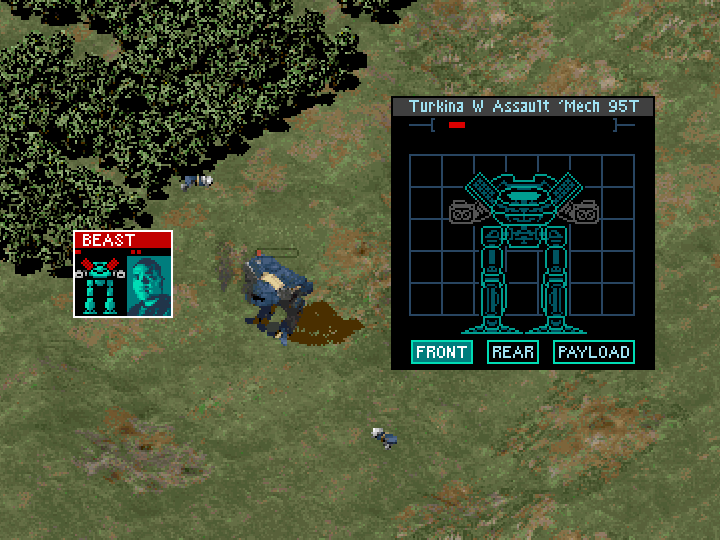
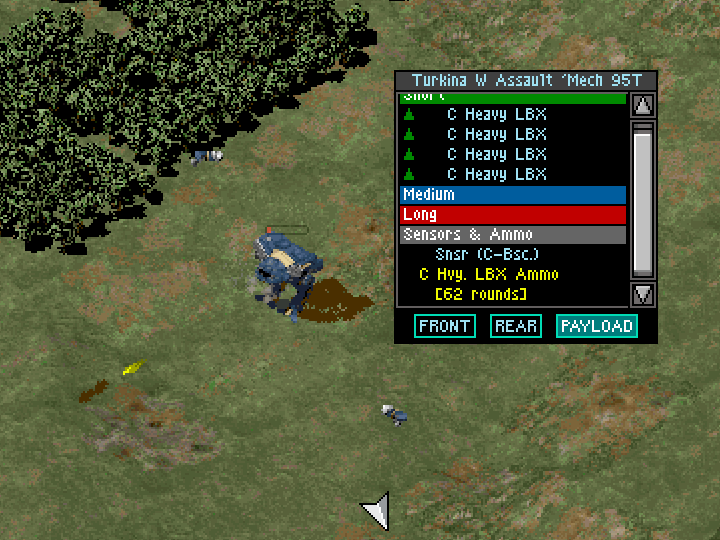
Interesting as a detour it would be, figuring out exactly what’s going on with the paperdoll discrepancy is out of scope, so let’s move on.
The distribution of weapons is not determined by nature, it is determined by code
Alrighty, so how — in general — is equipment distributed to a mech’s various locations?
Well, first thing is to find out where in the game code this is handled. One way to know if you’ve found the right code is to change the suspected function and see what happens in game.
In this case, I changed the suspected function to distribute unknown-thing into places where unknown-thing wasn’t supposed to go. After making this change, blowing off a mech’s left arm had the effect of immediately killing the pilot.. and not destroying any of the mech’s weapons. With the left arms popped and the pilots dead, I shot the mechs on the ground to blow off their right arms as well and they still didn’t lose any weapons – a fun side effect of the change I guess. I’m still kind of curious what locations the weapons actually did go to, but couldn’t reasonably explore every single question I had along this journey so I skipped answering this (focus-firing specific locations is very slow — even against stationary targets — so it would not be entirely trivial to answer empirically).
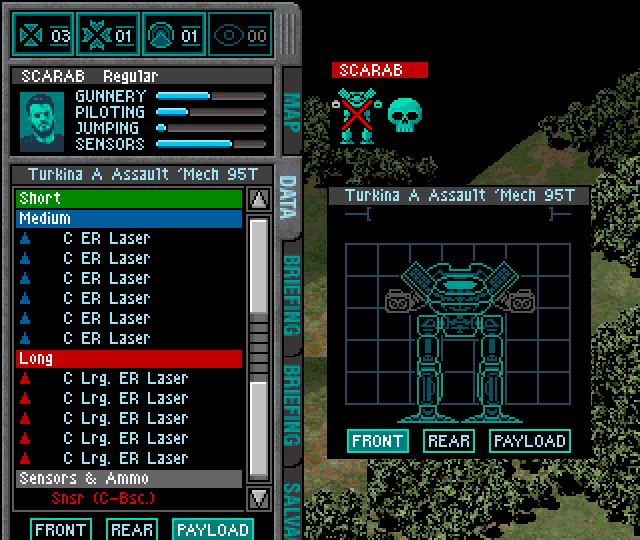
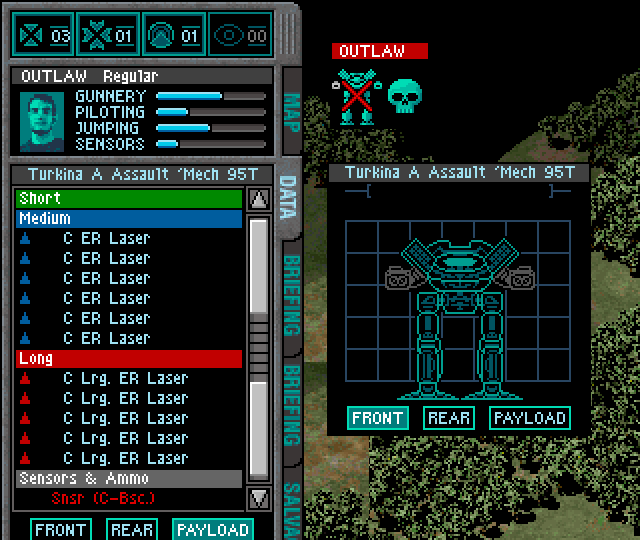
Tracing through the assignment of equipment onto the mech in a debugger suggests that I may have shifted at least the life support and engine into the left arm with my change, which would certainly explain the loss of both meat and metal once those were out of the picture. This itself is quite interesting, because it suggests that MechCommander actually does — at least in some capacity — make use of “internal equipment” like this instead of purely relying on checking the structural condition of a given location (head / CT, etc) – which is honestly what I thought it was doing in this situation.
As trivia, these are the components that seemed to be assigned to locations on the mech during my test (I didn’t specifically track which locations received which equipment):
- life support
- 2x hip
- 2x shoulder
- gyro
- sensors (presumably the specific sensor will match whatever the mech is equipped with)
- cockpit
- 2x leg actuator
- 2x arm actuator
- fusion engine
I can’t guarantee that all of this equipment actually does anything, but some non-zero amount of it does seem to have some non-zero effect on the game given the death-by-arm observed above.
Anyway, diving into that more is another out of scope concern. If you want to actually solve the problem you’re trying to figure out, sometimes you have to aggressively fend off these offers of dubious quests along winding paths amidst the forest of knowledge.
Here’s the top of the function that seems to be handling equipment distribution. I’m not going to run through the whole thing because it’s a couple hundred lines long, I don’t understand everything that it does, and doing so would be yet another out-of-scope detour.
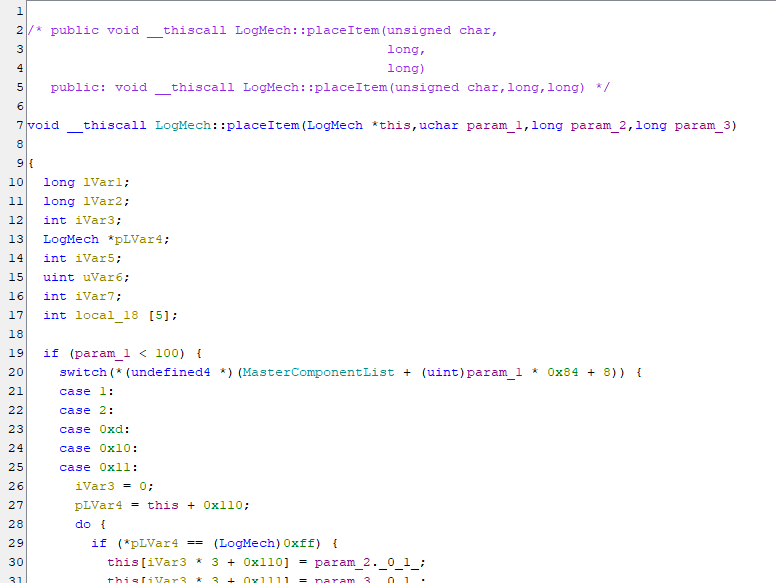
Relevant to us is the check at the top where param_1 is compared against 100. In the base game, weapons start at ID 100,5 which gives some insight to speculate that the top of the function handles the placement of non-weapon equipment (like the stuff listed above). That theory is supported by the available evidence, so it’s probably at least mostly correct, but it’s out of scope to exhaustively confirm it.
The part we really care about is how this function handles placement of weapons: equipment with an ID of >=100.
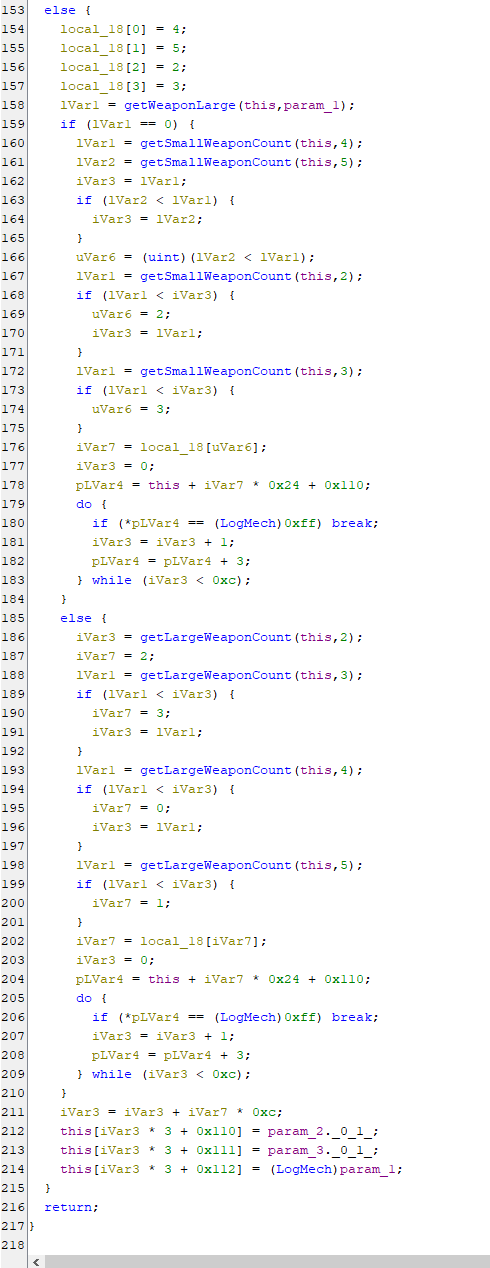
Thanks to the debugging symbols giving us some function names, most of the high-level details are pretty self-evident if you make some assumptions about what the called functions do:
- Check if a weapon is large or small.
- If small, assign to locations 2-5 based on an algorithm that checks for small weapons at those locations.
- If large, assign to locations 2-5 based on an algorithm that checks for large weapons at those locations.
If we play our arms left, we get to keep all the weapons
By time spent, going from the situation retold up to this point to then ultimately figuring out what was wrong was the longest part of this whole thing, but also wasn’t particularly interesting, so I’m going to give the highlights and skip over some of the boring stuff.
- The getWeaponLarge() function itself seemed to work as expected (with the caveat that the way it’s designed does itself have some issues e.g., with Desperate Measures weapons), so that didn’t seem to be the problem.
- The getSmallWeaponCount() and getLargeWeaponCount() functions themselves both seemed to work as expected, so neither of those seemed to be the problem either.
- The left arm6 seems to be location 4, and I assume the other three locations are right arm, left torso, and right torso, but I don’t know which location aligns with which number and it was out of scope to find out.
Tracing through component assignments, we see the in-game circumstances mirrored in memory: large weapons all end up in the same place, but small weapons are distributed.
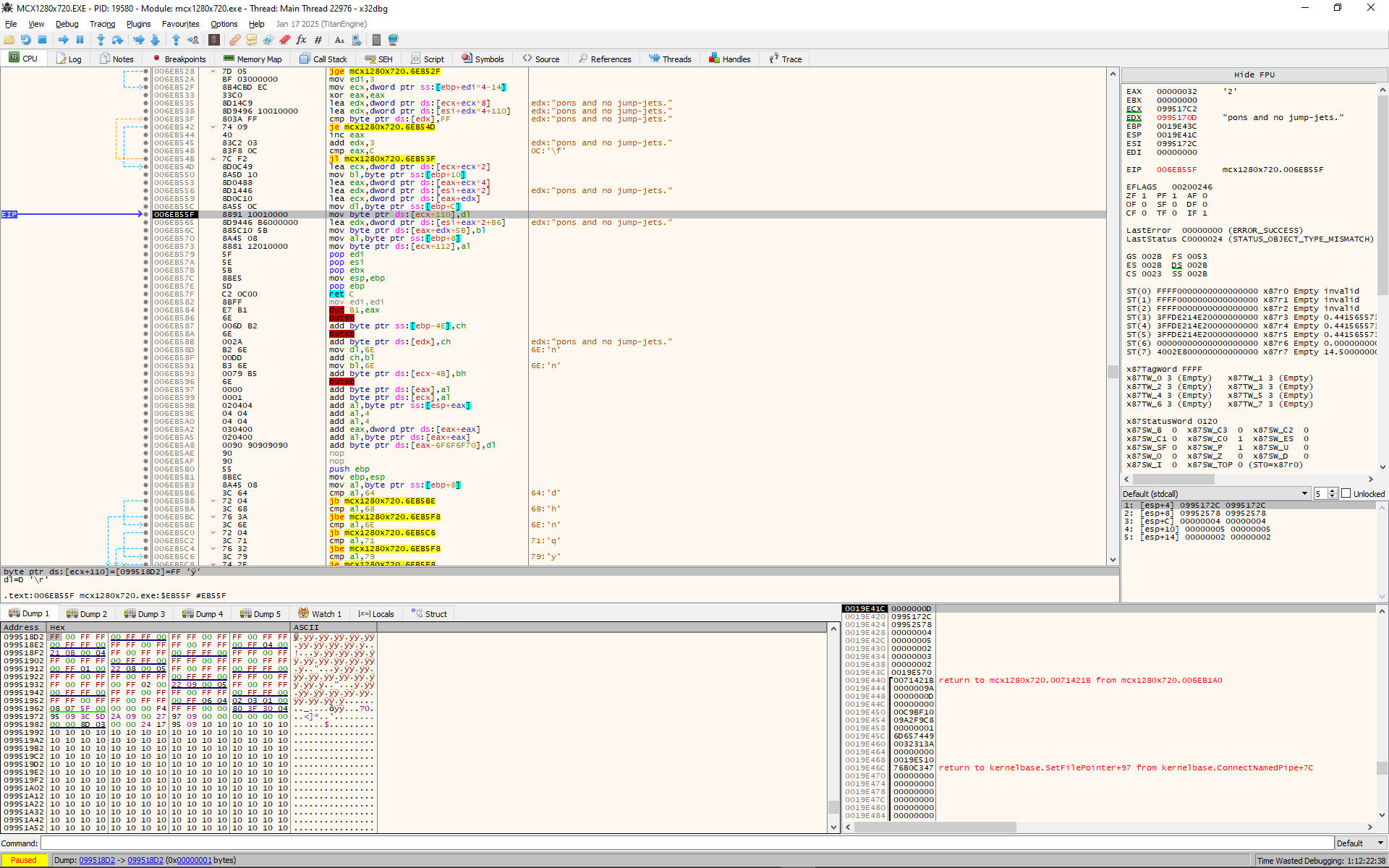
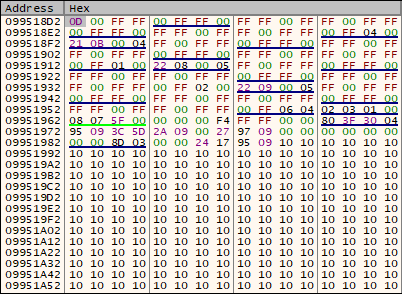
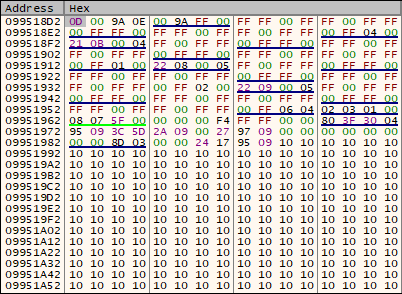
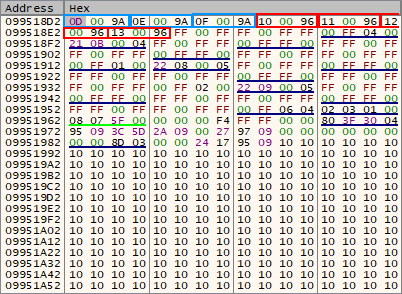
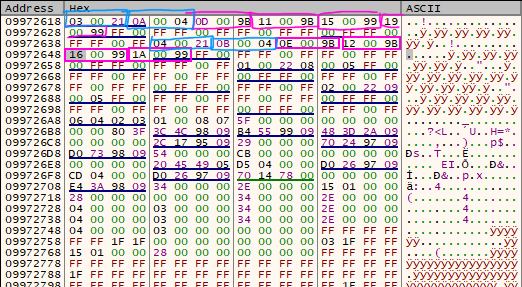
Note how Clan ER PPCs (blue outline in middle-right image) and Clan ER Large Lasers (red outline in middle-right image) are all placed contiguously in memory, which means they’re in the same location. Contrast this with the mix of Clan Pulse Lasers and Clan Heavy Flamers (pink outlines in bottom image) which are distributed in two places in this particular screenshot. Blue outlines in the bottom image are probably shoulders + arm actuators since that aligns with their component IDs (which suggests that these two locations are arms).
In the end, I figured out what the problem was by manually tracing through the code by hand like a caveman:7
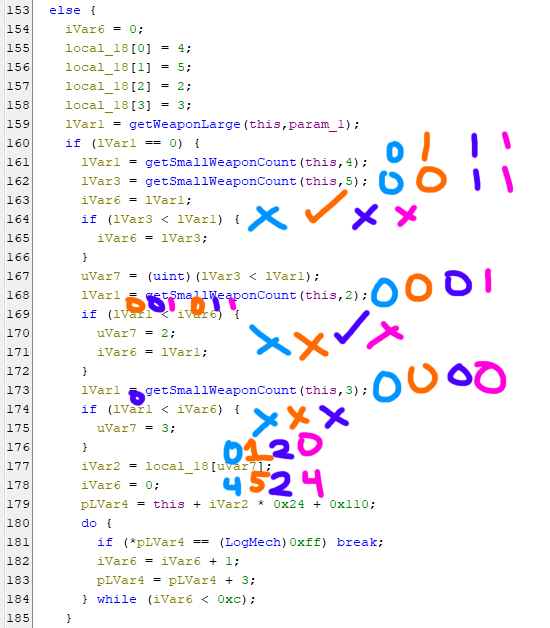
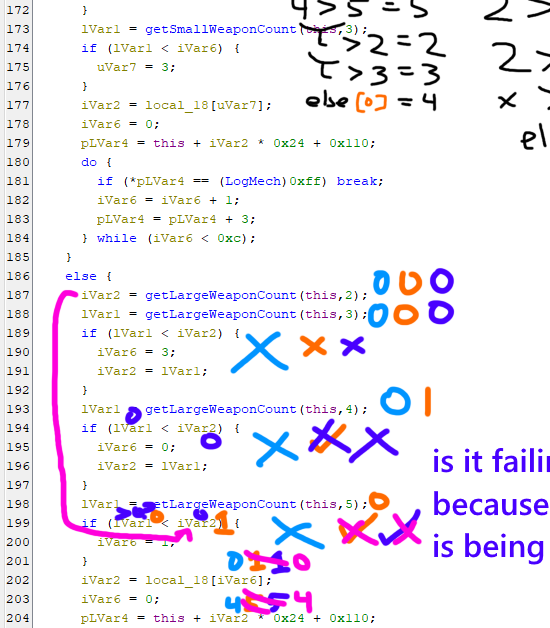
The way the placement for small weapons works will place the first weapon in the first location that gets checked (4), which means that when the second weapon is checked later, it moves to the second location because there’s a small weapon in the first slot already. This then repeats until there’s one weapon at each location, then two weapons, then three, and so on, until there are no more small weapons left to place. The “fallback” value when there are no small weapons in any of the locations is to place a weapon in the first location.
For large weapons, this doesn’t work because the “fallback” value places weapons in the last location. So every large weapon runs through the checks, never finds a weapon until the final location, and is then dumped into.. that same location (which is the left arm). The fallback value should be mirroring the setup of the small weapon algorithm: the first large weapon should be placed in location 2 (since that’s the first place where the large weapons check runs) so that all subsequent weapons will find a weapon in that location when running the first check.
The source of the fallback value is the iVar6 variable you see at the top of the left picture; 0. Because their location orders are different (4->5->2->3 vs 2->3->4->5), the fallback value that’s appropriate for the small weapon placement calculations is not suitable for the large weapon placement calculations.8
As a quick aside I do find it a little odd that there’s this amount of effort to distribute small weapons differently from large weapons. Maybe the intention was to avoid exactly what ended up happening due to the implementation error: the concentration of the most important weapons on a mech at any given location. If you imagine a mech that has two very large / heavy weapons (twin ER PPCs on medium mech for example) supported by light weapons, it’s definitely preferable to not have both of those PPCs in the same place for the sake of risk management. If that really was the goal of this design, this bug is particularly ironic.
Returning to “this view isn’t actually the source code, it’s just a C-like representation of the compiled code to make it easier to understand at a glance”, to fix this we have to go to the raw assembly which I’ve been shielding you from until now because you probably can’t understand it and I don’t really want to write an assembly 101 course.9
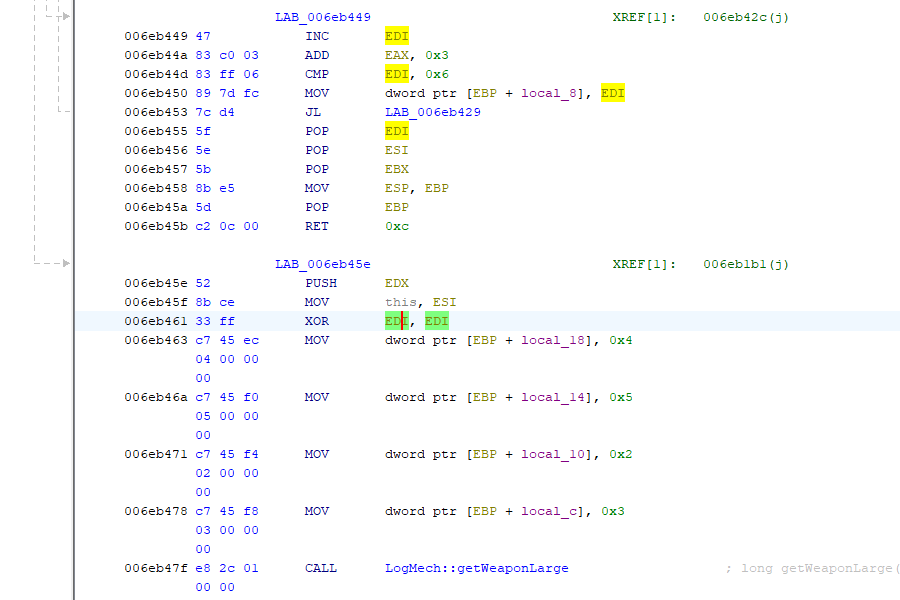
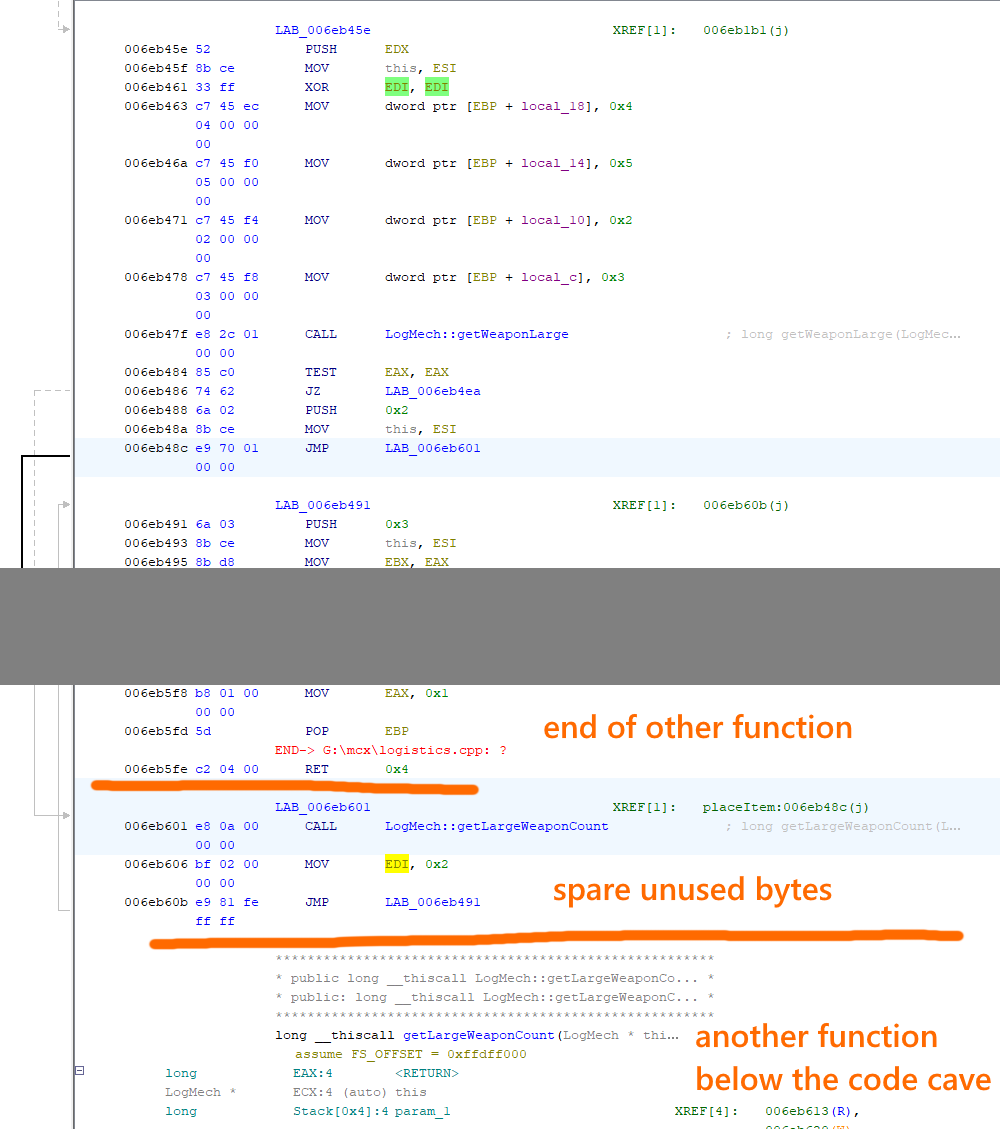
The value we’re interested in is stored in the EDI register (highlighted in green and yellow). Normally an XOR instruction is used to set the value of this register to 0. That works perfectly for the small weapons stuff, but we actually need the value to be set to 2 (not 0) for the large weapons stuff. We can’t just change the value by itself because that would break the way that small weapons are placed, and there’s no room here to assign two different values (because inserting new bytes would shift the whole program, causing it to no longer work). What we can do instead is find some spare unused bytes nearby — a code cave — jump to that location, and make the change there.
Just below the placeItem() function there’s a few unused bytes at the end of the next function – in fact exactly the right number. By jumping to that code cave, there’s just enough space to rewrite the instruction we had to overwrite just to jump into the code cave in the first place, then put a new value of 2 into the EDI register (for our large weapon fallback value), and finally jump back to the original code. Here’s what that looks like:
But does that actually solve it?
Beast, I need Charlie zone status, report
Applying the fix and organizing another friendly-fire accident:
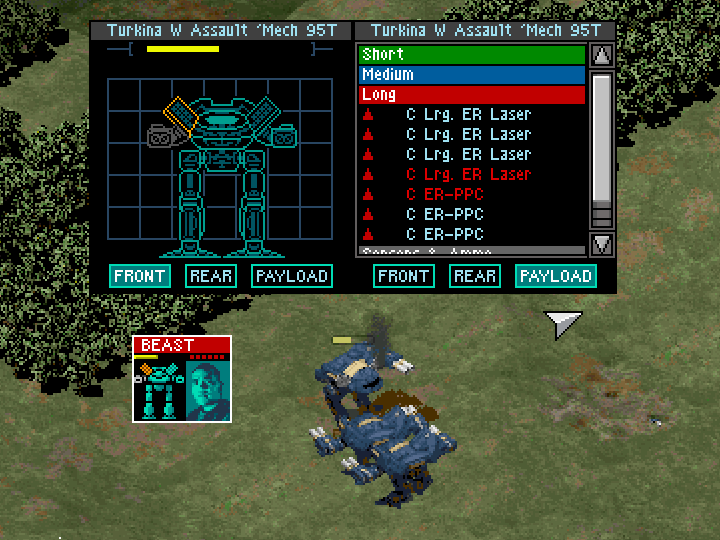
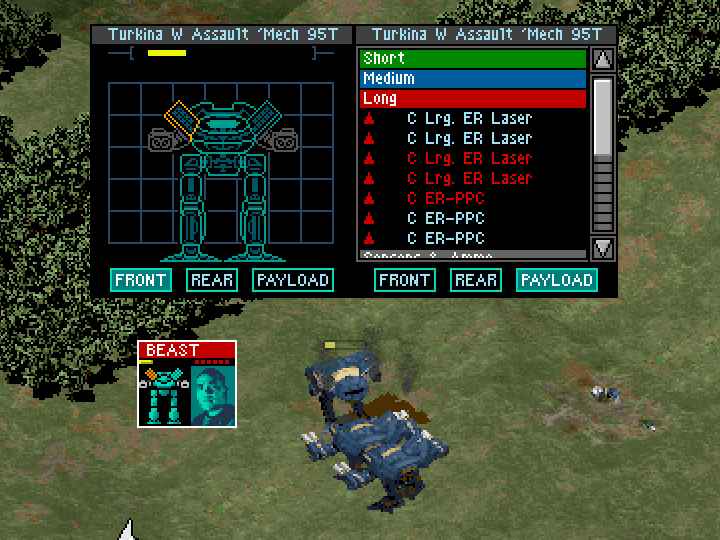
It seems to work! Large weapons are now being distributed across both of the mech’s arms as well as the other two probably-side-torso locations. Based on this result we can also speculate that location 2 (where large weapons are placed first) is a side torso and that location 5 is the right arm – we have 4/7 weapons left after losing both arms and we know that locations 4 and 5 receive large weapons before locations 2 and 3.
There’s still an unexplained question mark over why Beast thinks losing two arms and 3/7 weapons is grounds to report being at 25% health (power?), and unlike with the early LB-X test10 there’s limited side torso damage and no pilot injury here to explain the difference.
..Maybe there’s a bug with the way the bar — or its underlying value — is getting calculated? Like maybe the arms are hardcoded to count for m-
NO
OUT OF SCOPE
NOT GONNA FIX IT NOT GONNA FIX IT
AHHHHHHHHHHHHHHHHHHHHHHHHHH
Applying this fix for the left arm bug
If you want to replicate this change on your own MechCommander Gold exe, make a backup and then open the exe with a hex editor:
- At raw address 0xEB48C, replace the two bytes
E8 7FwithE9 70. - At raw address 0xEB601, replace the fifteen bytes
90 90 90 90 90 90 90 90 90 90 90 90 90 90 90withE8 0A 00 00 00 BF 02 00 00 00 E9 81 FE FF FF.
(If the bytes at these addresses doesn’t match what’s written here, you may have a different version of the game to the one I’ve worked on and you should not overwrite the bytes because your game probably won’t work if you do.)
You didn’t fix the classification of the Desperate Measures weapons, dipshit
Hey, Beast, hope you’re healing up okay. Thanks for pointing that out. We care deeply about the wellbeing of our pilots and really value your contribution to the discussion.
To be honest, I don’t think it matters that much for those weapons. All of the LB-X ACs are unfortunately unusable garbage so you should never be equipping them anyway, the Rail Gun and Long Tom are too heavy to (realistically) stack multiples on a single mech, and the Thunderbolt is a middling weapon in comparison to the deluge of top-tier weapons you’re gifted over the course of the Desperate Measures campaign – so if you do equip it, it would probably only be sparingly.
That leaves the only common victim being the Large X-Pulse Laser, and one victim isn’t so bad – particularly since the problem here is substantially less impactful than the left arm bug. Still, so long as we’re all okay with ruining the classification of the probably-unused weapons it’s much easier to fix than the left arm bug was, so I guess I might as well do it while I’m here.
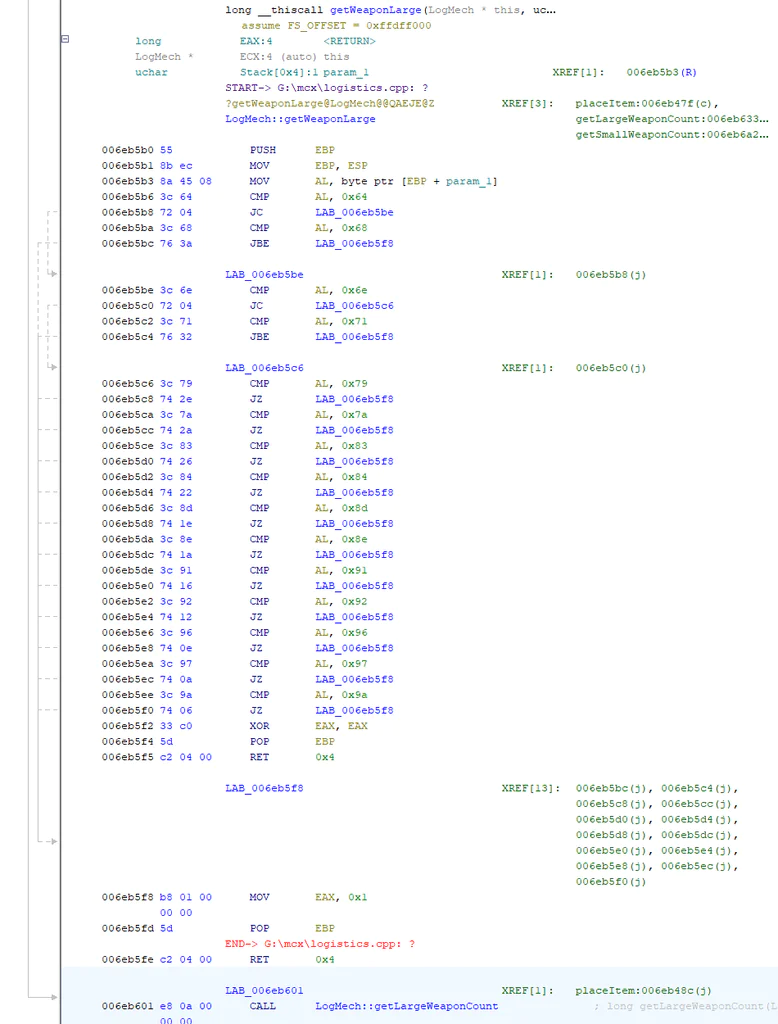
The original code uses a default-to-small system, where anything not explicitly specified as large in the function gets classified as small. However because literally every weapon added in Desperate Measures is (or more accurately should be) a large weapon, when making our changes it’s actually easier to flip this and default to large weapons, instead explicitly classifying the small weapons as small. We can also trim out references to weapons not available in the game to claw back some space while making our changes – this function has no room to overflow past its original length because the spare space below it is where our previous code cave is!
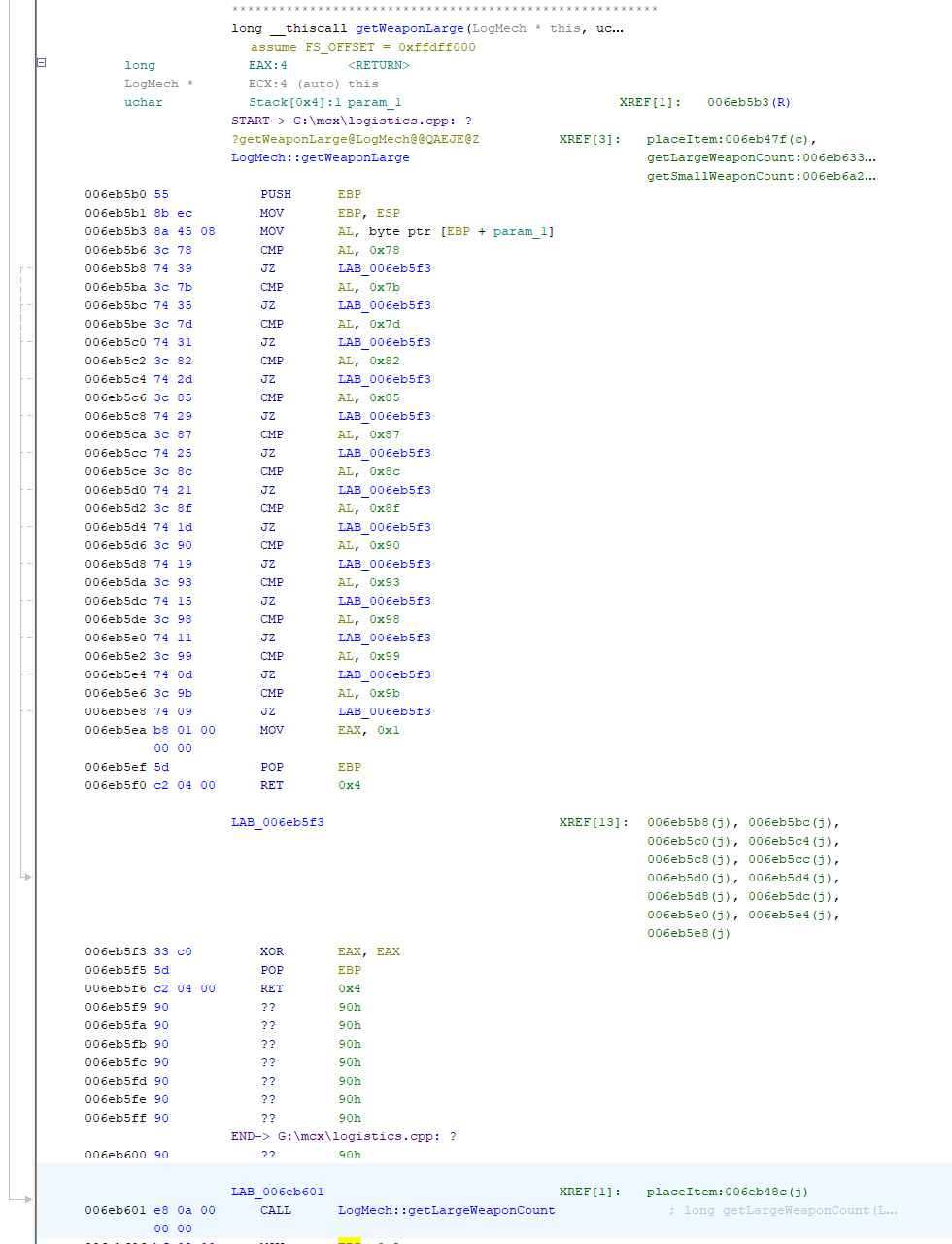
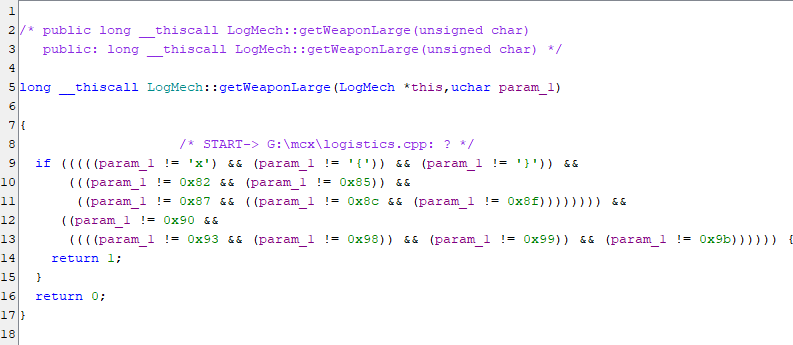
On the technical side the function is now slightly shorter11 but also unoptimized by a microsecond or so because in my replacement I prioritized slightly better readability over replicating the available performance optimization.12
I’ve left the Large Laser / Light AC situation as-is with the former still being “small” and the latter still being classified as “large”. Much like the original implementation, the logic of this revised version is still making assumptions about the weapons list, so if I’ve gotten something wrong about a weapon or if you do something like mod in new weapons, the function can classify wrongly just like the original already did.13
By temporarily reverting the patch for the left arm bug, we can spot-check the large/small classification change while ensuring that Beast gets plenty of training.
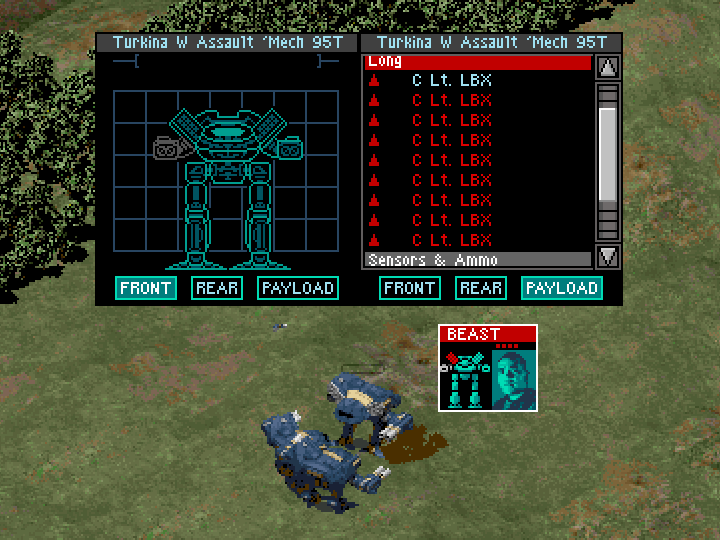
So the change seems to work — at least for this weapon — and Beast will get some much needed time off. fuck you commander I HEARD THAT
If you’d like to patch your copy of MechCommander Gold to update the weapon classification function to work as shown, make a backup then open the exe with a hex editor:
At raw address 0xEB5B0, replace the 81 bytes of1455 8B EC 8A 45 08 3C 64 72 04 3C 68 76 3A 3C 6E 72 04 3C 71 76 32 3C 79 74 2E 3C 7A 74 2A 3C 83 74 26 3C 84 74 22 3C 8D 74 1E 3C 8E 74 1A 3C 91 74 16 3C 92 74 12 3C 96 74 0E 3C 97 74 0A 3C 9A 74 06 33 C0 5D C2 04 00 B8 01 00 00 00 5D C2 04 00with55 8B EC 8A 45 08 3C 78 74 39 3C 7B 74 35 3C 7D 74 31 3C 82 74 2D 3C 85 74 29 3C 87 74 25 3C 8C 74 21 3C 8F 74 1D 3C 90 74 19 3C 93 74 15 3C 98 74 11 3C 99 74 0D 3C 9B 74 09 B8 01 00 00 00 5D C2 04 00 33 C0 5D C2 04 00 90 90 90 90 90 90 90 90.- (note that the first few bytes are the same in both sequences – this is intentional)
EDIT 2026-05-05: I’m just now realizing that default-to-large might interfere with the placement of ammo (as in, with the change, ammo might be distributed alongside large weapons rather than small weapons). I haven’t actually sat down to confirm how ammo is distributed, but I’m like 80% sure I’m right about this so I’m just going to fix it. If dropping the readability preference, there’s thankfully still just enough space to rewrite the function again as default-to-small without having to go looking for more space elsewhere. Since most of the large weapons are in sequential groupings, several weapons can be checked during each comparison to offset there being many more large than small weapons:
- At raw address 0xEB5B0, replace the 81 bytes of
55 8B EC 8A 45 08 3C 64 72 04 3C 68 76 3A 3C 6E 72 04 3C 71 76 32 3C 79 74 2E 3C 7A 74 2A 3C 83 74 26 3C 84 74 22 3C 8D 74 1E 3C 8E 74 1A 3C 91 74 16 3C 92 74 12 3C 96 74 0E 3C 97 74 0A 3C 9A 74 06 33 C0 5D C2 04 00 B8 01 00 00 00 5D C2 04 00with55 8B EC 8A 45 08 3C 62 72 04 3C 68 76 3A 3C 6B 72 04 3C 71 76 32 3C 74 72 04 3C 76 76 2A 3C 7E 74 26 3C 8B 72 04 3C 8E 76 1E 3C 91 72 04 3C 92 76 16 3C 96 72 04 3C 97 76 0E 3C 9A 74 0A 3C A0 74 06 33 C0 5D C2 04 00 B8 01 00 00 00 5D C2 04 00. - EDIT 2026-05-06: if you want the Rail Gun and Light Gauss Rifle to also be picked up as large weapons, you’ll need to also change the byte at raw address 0xEB1AD from
0x64to0x62(which will change the cutoff for non-weapon components from <100 to <98).
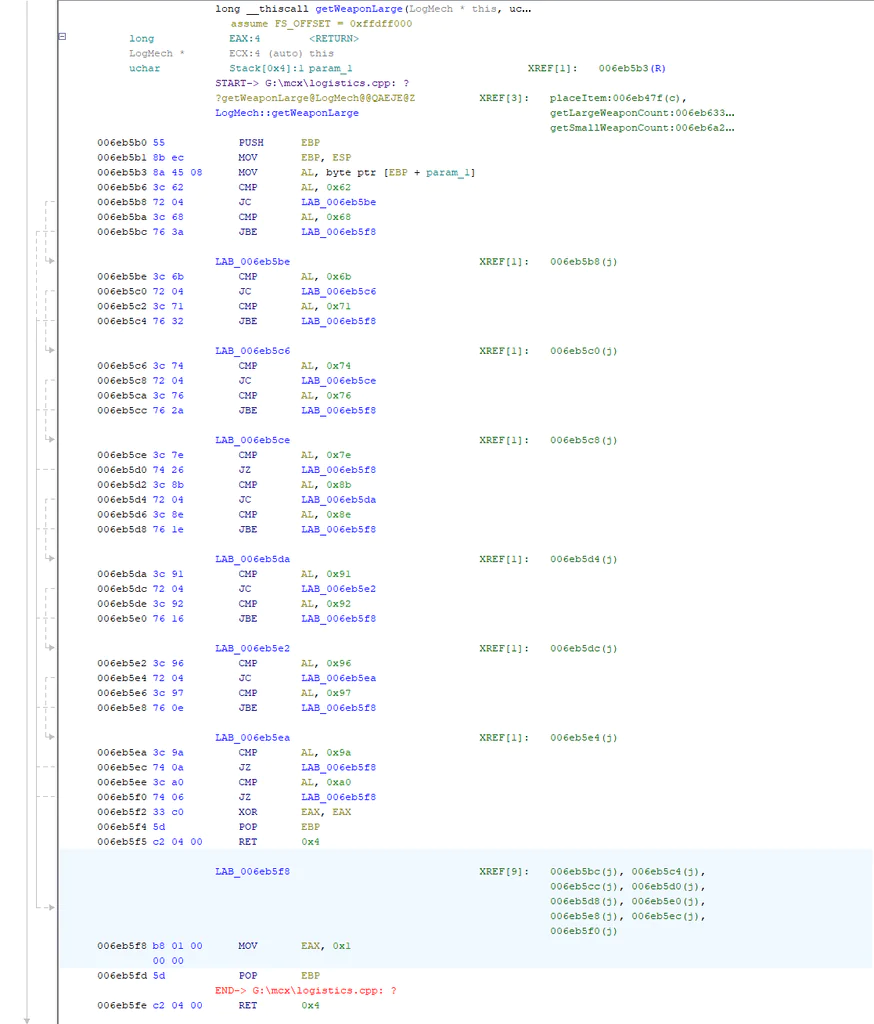
Both of the two fixes that I’ve described can be applied at the same time, and that’s of course what I’d recommend doing. I’ll be upfront that I haven’t extensively tested these changes – they seem to be correct, and I haven’t had any crashes while using them, but that’s a pretty low bar to clear. Just use them at your own risk and if you experience new types of crashes that you weren’t getting before then come back to let me know. I’m a basically-first-time MC1 modder who’s just squeezing in some one-off modding work on this between other things.
It looks like there’s another weird bug in the screenshot above for the Light LB-X test, where one single Light LB-X is saying it’s not inoperable, but Beast nonetheless can’t fire it (and the problem also isn’t lack of ammo unless the readout for that was also lying). I wonder if th-
AHHHHHHHHHHHHHH
NO
OUT OF SCOPE
OUT OF SCOPE
OUT OF SCOPE
I’M EJECTING EJECTING EJECTING E-15
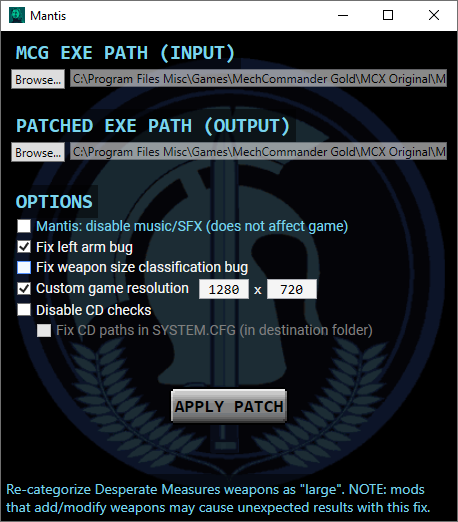
Update 2026-05-26: If you find hex editing intimidating, I’ve made a small patcher than can automate these fixes and some other things: https://github.com/MHLoppy/Mantis
- Not actually all — especially in Desperate Measures / MechCommander Gold — but we’ll get back to that later.
- Why barely anybody seems to have bothered to make use of them until now, I don’t know, but that’s an existential crisis for another time.
- This CSV file is being used just for the ID, since the tonnage values it has are wrong.
- Like that for mechs where a Larger Laser is an important weapon, the mech’s other weapons will probably be primarily small weapons, meaning distributing the Large Laser based on those other weapons may make sense. Conversely, mechs running Light ACs will tend to be long-range focused mechs, in which case their Light AC isn’t a “backup” weapon, it’s just one of their presumably-numerous long range weapons, and then they may separately have some smaller weapons so that they don’t die to an elemental riding their face.
- In Desperate Measures it starts at 98 due to 2 of the new weapons being added in the list before the originals.
- Or specifically whichever arm is actually in the location that gets shot when you use the “fire at left arm” command
- Note that not every step shown in the tracing is accurate – it didn’t need to be to uncover the problem.
- At least with the way the code is written – I wouldn’t say that it’s an inherent limitation of the general design.
- Though I do thoroughly recommend Nand to tetris if you’re interested in one.
- Which itself presents a question as to why none of the four Heavy LB-Xs were distributed into the arms when they were “small” – did all of the ammo just go into the arms while classified as “small”?
- Which is a bit ironic, given the code-cave situation immediately below it.
- Which would be using two sets of JC / JBE jumps for the two sets of two sequential numbers in 0x8F-0x90 and 0x98-0x99.
- If you’re a modder and your mod adds weapons, then this will affect you. I guess you could consider rewriting the function yourself to suit your mod, but there’s not really much space to do it – maybe try just dumping all weapons into either small or large and see if that works okay for you?
- As seen in the assembly above, the last several bytes in the updated code are NOP instructions.
- Hm, I did say for fun and profit. If you have spare coin, throw a few to your code mercenary and leave a nice review with the code mercenary review board: https://buymeacoffee.com/mhloppy
Got distracted personally with MC1 and MC2. Unfortunately the thing I really wanted doesn’t seem to work in the way I was hoping to find.
Weapons – a 6-pack a day keeps the Elementals away, but if you load up on racks, watch your back?
It looks like magic-wise, it’s a lot more doable to tweak a variable or slightly rearrange existing functions than to add something truly new? Unless you can jump all the way to the end of the file instead of looking for a cave, do whatever you like, then jump back up. Probably inefficient but this function seems like it’d only be used once a mission. Idk anything about assembly beyond a vague impression of it being horrible though.
The long chain of if() && if() seems like a really bad way to do it when they could have just set a flag or something on the weapon def.
If I’m reading it right, small guns go to arms first, big ones go to torsos first? Backwards from how most of the game’s mechs are canonically laid out but it does mean losing an arm costs less firepower and the PC games almost never have different firing arcs for arms.
Last LBX… wonder if weapons need their ammo to be in the same location, or if they can only feed from their own ammo bin. The Mechcommander 2 mech defs seem emphatic about part order. But again, out of scope.
Def very neat that you were able to sort it out.
RIP to your modding attempt.
It is possible to do a jump-to-the-end-and-back kind of thing (I do this with my patching work on RoN) but initially setting it up is a bit more involved because you need to basically allocate more space to the program. If you / someone were doing a bigger patch it’d be worth doing (it gives you virtually infinite space), but for a once-off like this probably not. There are also alternative ways to implement larger changes which you could look into at that point (which may be more sensible, tbh), but since this is what I’ve used in RoN it’s the method I know best. If you have the space you can add something more-or-less completely new, but you would have to do it in a way that understands the state of the system (registers, stack, memory) at the moment your new code starts, how to change that state to do what you want (including how to have the state set up the way that individual functions need so that you can call them), and then how to restore it to the original state once you’re done so that the program can continue executing its original code (restoration is straightforward though). If you jump in to tweak something then you don’t really have to understand as much of the state or how to change it, since you don’t necessarily need to know how to e.g., pull pilot info or weapon info into registers / memory so that you can actually use/read/manipulate it; the scope of what needs to be understood is very limited so long as the change you’re making is small.
For the way the function is set up, it’s possible that this is the result of compiler and the original function was more readable in its original C++ or whatever. Since I don’t really know how the weapon data is handled so it’s hard for me to say, and I don’t have grounded experience in how compilers specifically modify code structure when doing C++ -> assembly / machine code.
Yep, large-in-torso and small-in-arms seems to be how it’s set up. Not really sure why ¯\_(ツ)_/¯
If MC2 is fussy about something it seems like there’s a good chance MC1 would be as well given how surprisingly similar they’ve looked under the hood so far. You might also be able to look at some of the existing MC1 modding – maybe somebody has some anecdotal experience with how it works given that a few people have already added weapons and stuff.
Man, putting all the big weapons in the left arm? That’s just sinister
Yo! This is awesome! Have you by chance checkes out ironarthur’s work? He got pretty far decoding the source code and game files as well!
Ive been digging around his work and some of the binaries in mcg too (but nowhere close to this level of skill!). Atm, i am trying to continue ironarthur’s work, but have reached a wall with decoding the .gmm files used for creating maps in the game. But between me and iron, we have managed to get the assets out of the game pak files and into unity… here’s the very janky hacked together stuff we figured out 🙂
https://github.com/GypsyFromTheSatelliteofLove/MCUnityContinued
I think I saw the original MCUnity project briefly a couple months ago but didn’t look that hard at it.
As far as I understand, it (and your successor) are so far all focused on assets? So from a mess-around-with-it perspective it’s cool, but you’d still need to recreate the game code to have something resembling MC1 in more than just visuals. I guess you could theoretically not attempt to re-create the logic and just roll your own but then I’m not really sure what the end goal would be for the project then.
I unfortunately don’t have any advice to offer on your .gmm files issue. I’m also probably not as good at this as you think I am 😛 (I’ve never even solved a simple crackme ( https://en.wikipedia.org/wiki/Crackme ) lol), but good luck with your efforts! I imagine the few online MC/BT communities would be interested in hearing about it, and I know there’s been recent interest in abusing LLMs to work on MC2.
Much better than me for sure!
True about writing game logic… but i think for a modern map and campaign editor, the gmm file is the last one needed? Maybe? But from what ive seen, its the last one IronArthur didnt fully decode?
I think if the gmm files (which i think is the data for the hierarchical astar they used? Like the rooms and doors info?) I think an editor would be more realistic?
But anyway, congrats on this work, its really good! If by any chance you get to peak into the gmm (or any other game logic from the data), please let us know?
Sure, I’ll let you know if I figure out the .gmm files, but just to be straightforward that I think it’s extremely unlikely that I will. I think I’d probably have to reverse engineer a huge chunk of the game to do it (and even then, maybe the game exe doesn’t explain the format of all of its file types!), but the time and effort — for someone of my limited skill level — is hard to justify against an existing backlog of other projects.
One of the reasons I could do the change in the article is because I got pretty lucky and the thing I wanted to fix involved a relatively isolated system which was relatively easy to understand. One of the other gameplay bugs that I wanted to fix (LB-X damage) I’ve spent nearly as much time and effort on but have made basically no progress on fixing because the systems involved are larger and interconnected, and they’re individually much harder to understand (let alone when having to combine multiple bits together to get the full picture). I expect the code required to understand .gmm files — if it’s explained by the game code rather than some separate tool which we don’t have — is probably more like that than like the simpler weapon distribution code :'(
No prob hehe the fact that you got as far as you did is already hero stuff 🙂
Oh and i am defo not the sort to abuse the poor LLMs :)… i am very much in the handmade camp (just bad at it lol) but welcome coders who would take that route since i think that is the future for sure… but seeing efforts like yours is really inspiring 🙂